

Native Major MC Version:
1.21
Tested Major MC Versions:
English, German, Italian, French, Spanish


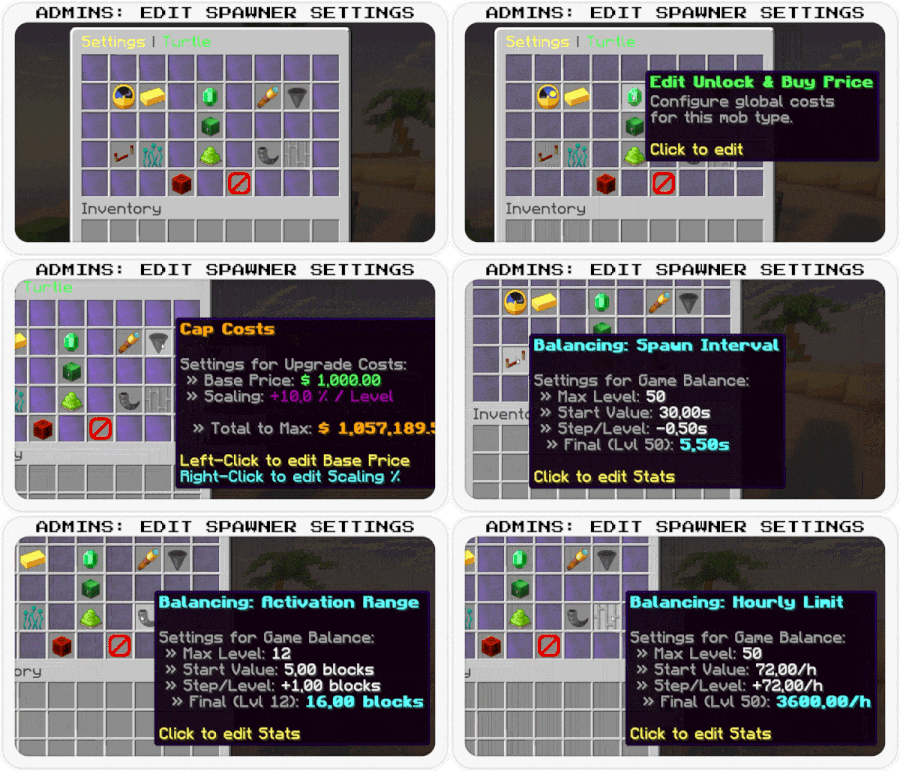
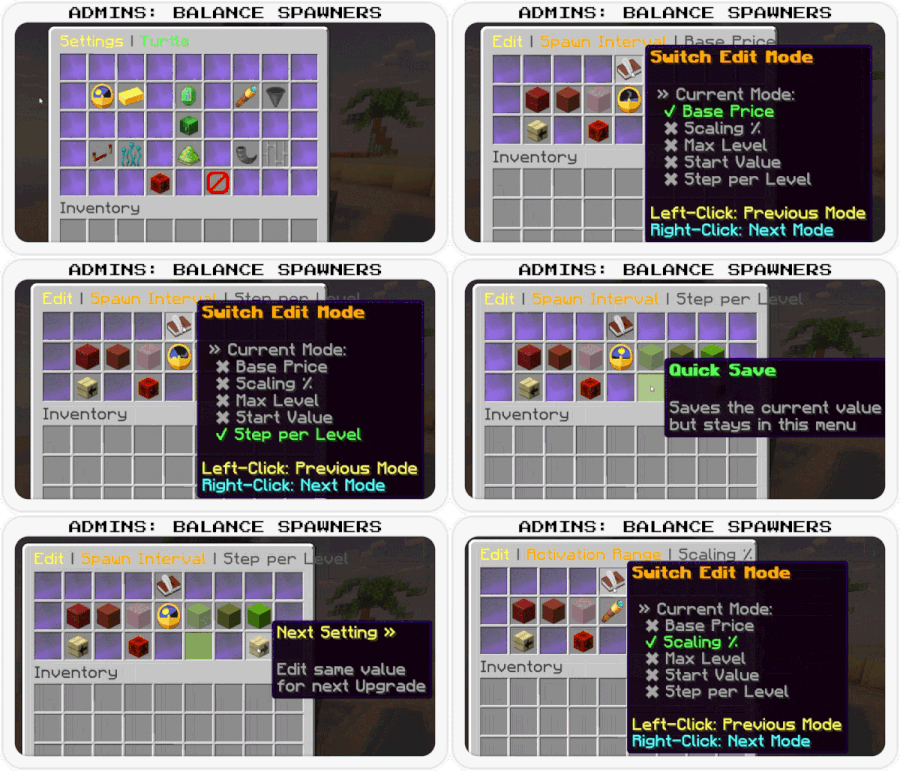
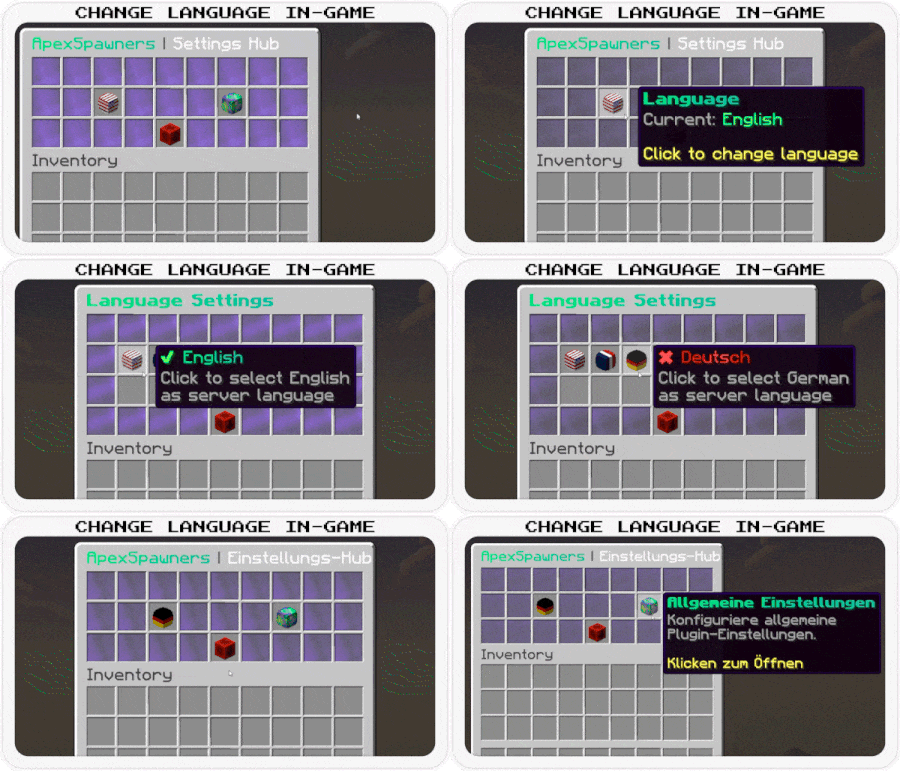

Code (YAML):
# ==============================================================================
# APEXSPAWNERS - CONFIGURATION & LANGUAGE FILE
#
# Format: MiniMessage (https://docs.advntr.dev/minimessage/format.html)
# Placeholders: <prefix> is automatically available in most messages.
# ==============================================================================
# Global Prefix used in chat messages
prefix: "<dark_gray>[<gradient:#00E676:#00BFA5>ApexSpawners</gradient><dark_gray>] <gray>"
# Console messages
console:
enabled: "<prefix><green>v<version> enabled successfully!"
disabled: "<prefix><red>disabled"
loading-textures: "<prefix><yellow>Loading item textures..."
vault-missing: "<prefix><dark_red><bold>ERROR: Vault dependency not found! Disabling plugin"
language-updater:
checking: "<prefix><yellow>Checking language files for missing keys..."
patched-file: "<prefix>Patched <white><file><gray>: Added <green><count> <gray>new keys."
done: "<prefix><green>Language patch finished. Total: <gold><total> <green>keys in <gold><files> <green>files."
error-resource: "<prefix><red>Could not find internal resource for: <file>"
error-save: "<prefix><red>Could not save updated language file: <file>"
update-available:
new-version-found: "<prefix><gray>A new version is available!"
current-version: "<prefix><gray>Current: <red>v<current>"
latest-version: "<prefix><gray>New: <green><new>"
download-link: "<prefix><yellow>Download: <click_spigot><hover:show_text:'<gold>Go to SpigotMC'><gradient:#FF9966:#FF5E62><b>[Spigot]</b></gradient></hover></click_spigot> <dark_gray>| <click_bbb><hover:show_text:'<aqua>Go to BuiltByBit'><gradient:#00F260:#0575E6><b>[BuiltByBit]</b></gradient></hover></click_bbb>"
error-checking: "<prefix><red>Failed to check for updates via SpigetAPI: <error>"
# ==============================================================================
# UPGRADES
# Names of the upgrades
# ==============================================================================
upgrade-names:
interval: "Spawn Interval"
amount: "Spawn Amount"
range: "Activation Range"
limit: "Hourly Limit"
# ==============================================================================
# ENTITY DEFINITIONS
# Names and categories for Mobs and Items
# ==============================================================================
# Display names for all supported mobs
mobs:
# Passive
bee: "<gradient:#FFD700:#FFA500>Bee</gradient>"
camel: "<gradient:#F4A460:#D2B48C>Camel</gradient>"
cat: "<gradient:#FFA500:#FFFFFF>Cat</gradient>"
chicken: "<gradient:#FFFFFF:#D3D3D3>Chicken</gradient>"
cow: "<gradient:#808080:#363636>Cow</gradient>"
donkey: "<gradient:#8B4513:#A0522D>Donkey</gradient>"
fox: "<gradient:#FF8C00:#FF4500>Fox</gradient>"
frog: "<gradient:#32CD32:#006400>Frog</gradient>"
goat: "<gradient:#D3D3D3:#FFFFFF>Goat</gradient>"
horse: "<gradient:#8B4513:#D2691E>Horse</gradient>"
llama: "<gradient:#F5DEB3:#D2B48C>Llama</gradient>"
mule: "<gradient:#8B4513:#2F4F4F>Mule</gradient>"
panda: "<gradient:#FFFFFF:#000000>Panda</gradient>"
parrot: "<gradient:#FF0000:#0000FF>Parrot</gradient>"
pig: "<gradient:#FFB6C1:#FF69B4>Pig</gradient>"
polar_bear: "<gradient:#F0F8FF:#B0E0E6>Polar Bear</gradient>"
rabbit: "<gradient:#DCDCDC:#808080>Rabbit</gradient>"
sheep: "<gradient:#FFFFFF:#DCDCDC>Sheep</gradient>"
sniffer: "<gradient:#8B0000:#228B22>Sniffer</gradient>"
turtle: "<gradient:#008000:#ADFF2F>Turtle</gradient>"
wolf: "<gradient:#D3D3D3:#696969>Wolf</gradient>"
# Utility & Golems
iron_golem: "<gradient:#E6E6E6:#A9A9A9>Iron Golem</gradient>"
snow_golem: "<gradient:#FFFFFF:#E0FFFF>Snow Golem</gradient>"
villager: "<gradient:#8B4513:#008000>Villager</gradient>"
wandering_trader: "<gradient:#00008B:#FFD700>Wandering Trader</gradient>"
# Hostile
breeze: "<gradient:#AFEEEE:#E0FFFF>Breeze</gradient>"
cave_spider: "<gradient:#006400:#2F4F4F>Cave Spider</gradient>"
creeper: "<gradient:#32CD32:#006400>Creeper</gradient>"
drowned: "<gradient:#00CED1:#2F4F4F>Drowned</gradient>"
elder_guardian: "<gradient:#D3D3D3:#4B0082>Elder Guardian</gradient>"
enderman: "<gradient:#9400D3:#000000>Enderman</gradient>"
evoker: "<gradient:#696969:#FFD700>Evoker</gradient>"
guardian: "<gradient:#00CED1:#FF8C00>Guardian</gradient>"
husk: "<gradient:#DAA520:#8B4513>Husk</gradient>"
phantom: "<gradient:#483D8B:#000080>Phantom</gradient>"
pillager: "<gradient:#696969:#8B0000>Pillager</gradient>"
ravager: "<gradient:#696969:#2F4F4F>Ravager</gradient>"
silverfish: "<gradient:#A9A9A9:#696969>Silverfish</gradient>"
skeleton: "<gradient:#F5F5F5:#A9A9A9>Skeleton</gradient>"
slime: "<gradient:#32CD32:#98FB98>Slime</gradient>"
spider: "<gradient:#8B0000:#000000>Spider</gradient>"
stray: "<gradient:#B0E0E6:#708090>Stray</gradient>"
vindicator: "<gradient:#696969:#00008B>Vindicator</gradient>"
warden: "<gradient:#008080:#00008B>Warden</gradient>"
witch: "<gradient:#800080:#008000>Witch</gradient>"
zombie: "<gradient:#006400:#228B22>Zombie</gradient>"
# Nether
blaze: "<gradient:#FFD700:#FF4500>Blaze</gradient>"
ghast: "<gradient:#F5F5F5:#DCDCDC>Ghast</gradient>"
hoglin: "<gradient:#FF6347:#8B0000>Hoglin</gradient>"
magma_cube: "<gradient:#8B0000:#FF4500>Magma Cube</gradient>"
piglin: "<gradient:#F08080:#DAA520>Piglin</gradient>"
piglin_brute: "<gradient:#8B0000:#DAA520>Piglin Brute</gradient>"
strider: "<gradient:#FF6347:#800080>Strider</gradient>"
wither_skeleton: "<gradient:#2F4F4F:#000000>Wither Skeleton</gradient>"
zoglin: "<gradient:#FF4500:#2F4F4F>Zoglin</gradient>"
zombified_piglin: "<gradient:#FF69B4:#006400>Zombified Piglin</gradient>"
# Water
axolotl: "<gradient:#FFB6C1:#FF69B4>Axolotl</gradient>"
glow_squid: "<gradient:#00CED1:#008B8B>Glow Squid</gradient>"
squid: "<gradient:#00008B:#4169E1>Squid</gradient>"
# Display names for mob categories (used in Shop Filter)
mob-types:
passive: "<green>Passive Mobs"
hostile: "<dark_red>Hostile Mobs"
nether: "<dark_purple>Nether Mobs"
utility_and_golems: "<gold>Utility & Golems"
water: "<aqua>Water Mobs"
# Item formats (Inventory Items)
items:
spawner:
name: "<gold><mob> Spawner"
# Top part of the lore (including stats)
lore-header:
- "<dark_gray><st> "
- "<gray>Mob: <mob>"
- ""
- "<gray>Upgrades:"
- "<dark_gray> » <white>Delay: <aqua>Lvl <delay>"
- "<dark_gray> » <white>Amount: <aqua>Lvl <amount>"
- "<dark_gray> » <white>Range: <aqua>Lvl <range>"
- "<dark_gray> » <white>Cap: <aqua>Lvl <cap>"
# Only displayed if the spawner has a specific owner
lore-owner:
- ""
- "<gray>Bound to:"
- "<red><name>"
# Bottom part of the lore
lore-footer:
- "<dark_gray><st> "
- "<yellow>Place to activate!"
# ==============================================================================
# CHAT MESSAGES
# General, Admin, Help, and Feature-specific messages
# ==============================================================================
general:
no-permission: "<prefix><red>You don't have permission to do this!"
only-players: "<prefix><red>This command can only be used by players!"
console-usage: "<prefix><red>Console must provide arguments (e.g. /spawners give ...)"
unknown-command: "<prefix><red>Unknown subcommand. Use <click:run_command:'/spawners help'><hover:show_text:'<green>Click to open help menu!'><gold>/spawners help</gold></hover></click> <red>for help"
usage-settings: "<prefix><gray>Usage: <gold>/spawners settings <mob>"
usage-give: "<prefix><red>Usage: /spawners give <player> <mob> [amount]"
mob-not-found: "<prefix><red>Mob <mob> not found!"
player-not-found: "<prefix><red>Player not found or offline"
invalid-mob-type: "<prefix><red>Invalid Mob Type. Use Tab-Complete"
invalid-amount: "<prefix><red>Invalid amount"
inventory-full: "<prefix><yellow>Inventory full! Item dropped on ground"
reload-success: "<prefix><green>Configuration and language files reloaded!"
admin:
give-sender: "<prefix><green>Gave <gold><amount></gold> <mob> <spawner_text> to <player>"
give-receiver: "<prefix><green>You received <gold><amount></gold> <mob> <spawner_text>"
help:
header: "<dark_gray><st> "
title: "<gradient:#00E676:#00BFA5>ApexSpawners</gradient> <bold><#00E676>Help"
overview: "<dark_gray> • <click:run_command:'/spawners'><hover:show_text:'<green>Click to view your spawners'><gold>/spawners</gold></hover></click> <gray>- Open your spawner overview"
shop: "<dark_gray> • <click:run_command:'/spawners shop'><hover:show_text:'<green>Click to open shop!'><gold>/spawners shop</gold></hover></click> <gray>- Open the spawner shop"
settings: "<dark_gray> • <click:run_command:'/spawners settings'><hover:show_text:'<yellow>Click to open settings'><gold>/spawners settings (mob)</gold></hover></click> <gray>- Open global or mob settings"
reload: "<dark_gray> • <click:run_command:'/spawners reload'><hover:show_text:'<red>Reload configs'><gold>/spawners reload</gold></hover></click> <gray>- Reload configuration"
give: "<dark_gray> • <click:suggest_command:'/spawners give '><hover:show_text:'<yellow>Give spawners to players'><gold>/spawners give <player> <mob> (amount)</gold></hover></click> <gray>- Give Spawners"
footer: "<dark_gray><st> "
shop:
buy-success: "<prefix>You purchased a <mob> spawner for <gold><price></gold>"
unlock-success: "<prefix>You unlocked <mob><green> spawners! You can now buy them"
unlock-failed-money: "<prefix><red>Not enough money to unlock this mob!"
no-permission-unlock: "<prefix><red>You don't have the permission to unlock this mob!"
buy-failed-money: "<prefix><red>Not enough money to buy this item!"
buy-failed-inventory: "<prefix><red>Your inventory is full!"
spawner:
# Interaction messages (Place/Break/Interact)
mob-disabled: "<prefix><red>This mob type is currently disabled by the server administration"
soulbound-place-prevent: "<prefix><red>You cannot place this Spawner! It is soulbound to another player"
place-success: "<mob><green> Spawner placed successfully!"
break-prevent: "<prefix><red>You cannot break this Spawner manually!"
break-hint: "<prefix><gray>Open the menu (Right-Click) to pick it up"
not-owner-edit: "<prefix><red>You cannot edit this Spawner! It belongs to another player"
# ==============================================================================
# VISUALS: HOLOGRAMS
# ==============================================================================
hologram:
# The hologram layout. Each line is a new line in-game.
# Empty strings ("") create vertical spacing.
lines:
- ""
- "<mob> <aqua><bold>SPAWNER"
- ""
- "<gray>Current State:"
- "<status>"
- "<progress_bar>"
- ""
- "<gray>Hourly Limit:"
- "<gray> » Used: <red><used> <hourly_limit_separator> <max_hourly_color><max>"
- "<gray> » Reset: <time>"
- ""
- "<gray>Entity Limit:"
- "<gray> » Alive: <red><alive> <separator> <max_color><max_alive>"
- ""
# Time formatting for holograms
time-format:
waiting: "<aqua>Waiting for Spawn..."
cooldown: "<yellow><minutes>m <seconds>s"
# ==============================================================================
# GRAPHICAL USER INTERFACES (GUIs)
# Configuration for all menus and inventories
# ==============================================================================
gui:
units:
seconds: "s"
mobs: " Mobs"
blocks: " Blocks"
per-hour: " Mobs/h"
# ---------------------------------------------------------------------
# Global Buttons (Used across multiple menus)
# ---------------------------------------------------------------------
buttons:
next-page:
name: "<green>Next Page"
lore:
- "<gray>Go to the"
- "<gray>next page"
previous-page:
name: "<red>Previous Page"
lore:
- "<gray>Return to the"
- "<gray>previous page"
close:
name: "<red>Close Menu"
lore:
- "<gray>Click to close"
back:
name: "<red>Go Back"
lore:
- "<gray>Return to the"
- "<gray>last menu"
# ---------------------------------------------------------------------
# Settings Hub Menu
# ---------------------------------------------------------------------
settings-hub-menu:
title: "<gradient:#00E676:#00BFA5>ApexSpawners</gradient> <dark_gray>| <white>Settings Hub"
language-item:
name: "<gradient:#00E676:#00BFA5><bold>Language"
lore:
- "<gray>Current: <green><current_lang>"
- ""
- "<gradient:#00E676:#00BFA5><bold>Click</bold></gradient> <gray>to <white>change language"
back-button:
name: "<green><bold>Back to Shop"
lore:
- "<gray>Click to return"
- "<gray>to the mob shop"
general-settings-item:
name: "<gradient:#00E676:#00BFA5><bold>General Settings"
lore:
- "<gray>Configure general"
- "<gray>plugin behavior."
- ""
- "<gradient:#00E676:#00BFA5><bold>Click</bold></gradient> <gray>to <white>open"
# ---------------------------------------------------------------------
# General Settings Menu
# ---------------------------------------------------------------------
general-settings-menu:
title: "<gradient:#00E676:#00BFA5><bold>General Settings"
back-button:
name: "<red>Back to Hub"
lore:
- "<gray>Click to return"
- "<gray>to the settings"
- "<gray>hub"
unlock-perm-item:
name: "<gold>Require Unlock Perms"
lore:
- "<gray>Restrict mob unlocking"
- "<gray>to players with:"
- "<white>apexspawners.unlock.<mob>"
- ""
- "<gray>Status: <status>"
- ""
- "<gradient:#00E676:#00BFA5><bold>Click</bold></gradient> <gray>to <white>toggle"
status-true: "<green>True"
status-false: "<red>False"
# ---------------------------------------------------------------------
# Language Selection Menu
# ---------------------------------------------------------------------
language-menu:
title: "<gradient:#00E676:#00BFA5><bold>Language Settings</gradient>"
items:
english:
name: "<active_color>English"
lore:
- "<gray>Click to select English"
- "<gray>as server language"
german:
name: "<active_color>Deutsch"
lore:
- "<gray>Click to select German"
- "<gray>as server language"
french:
name: "<active_color>Français"
lore:
- "<gray>Click to select French"
- "<gray>as server language"
spanish:
name: "<active_color>Español"
lore:
- "<gray>Click to select Spanish"
- "<gray>as server language"
messages:
changed: "<prefix><green>Language changed to <gold><lang><green>!"
already-selected: "<prefix><red>This language is already selected!"
# ---------------------------------------------------------------------
# Player Menu: Spawner Upgrades
# ---------------------------------------------------------------------
upgrade-menu:
title: "<yellow>Spawner <dark_gray>| <mob>"
# Time formatting specifically for this menu
time-format:
waiting: "<aqua>Ready"
cooldown: "<yellow><minutes>m <seconds>s"
# Status Indicators (Info Item & Toggle Button)
status:
disabled: "<dark_red><bold> DISABLED (Server)"
stopped: "<red> STOPPED (Manually)"
paused-mob-limit: "<red> PAUSED (Mob Limit)"
paused-hourly-limit: "<gold> PAUSED (Hourly Limit)"
owner-out-of-range: "<#FFA500> PAUSED (Owner Out of Range)"
active: "<green> SPAWNING"
active-toggle: "<green><bold>ACTIVE"
stopped-toggle: "<red><bold>STOPPED"
waiting: "<aqua>Waiting for Spawn..."
# Center Info Item
info-item:
name: "<mob> <aqua><bold>Spawner"
lore:
- ""
- "<gray>Current State:"
- "<status>"
- ""
- "<progress_bar>"
- ""
- "<gray>Hourly Limit:"
- "<gray> » Used: <red><used> <hourly_limit_separator> <max_hourly_color><max>"
- "<gray> » Reset: <time>"
- ""
- "<gray>Entity Limit:"
- "<gray> » Alive: <red><alive> <separator> <max_color><max_alive>"
# Upgrade Items (Delay, Amount, etc.)
upgrade-item:
name: "<gold><name> <dark_gray>(Lvl <level>)"
lore-current: "<gray> » Current: <yellow><value>"
lore-next: "<gray> » Next: <green><value>"
lore-cost: "<gray> » Cost: <aqua><cost>"
lore-click: "<yellow>Click to upgrade!"
lore-maxed: "<red><bold>MAX LEVEL REACHED"
# Toggle Button
toggle-item:
name: "<gray>Spawner Status: <status>"
lore:
- "<gray>Click to toggle"
# Break Button
break-item:
name: "<red>Pickup Spawner"
lore:
- ""
- "<gray>Click to break the spawner"
- "<gray>and put it in your inventory"
- "<yellow>Keeps upgrades & cooldowns!"
back-button:
name: "<red><bold>Back to your Spawners"
lore:
- "<gray>Click to return to your"
- "<gray>spawners overview"
# Feedback messages
messages:
upgrade-success: "<green>Upgraded <gold><feature>: <gray><st>Level <old></st> <dark_gray>» <green><bold>Level <new>"
not-enough-money: "<prefix><red>Not enough money!"
inventory-full: "<prefix><red>Your inventory is full!"
picked-up: "<prefix><green>Picked up <spawner><green> spawner"
# ---------------------------------------------------------------------
# Player Menu: Mob Shop (/as shop)
# ---------------------------------------------------------------------
shop-menu:
title: "<yellow>Shop <dark_gray>| <light_purple>Mob Spawners"
# Filter & Sort Button
filter-item:
name: "<gold>Filter & Sort"
filter-all-name: "<yellow>All Mobs"
header-filter: "<dark_purple> » Filter (Left-Click):"
entry-active: "<green> ✔ <name> <counts>"
entry-inactive: "<dark_gray> ✖ <name> <counts>"
header-sort: "<aqua> » Sort (Right-Click):"
sort-asc-active: "<green> ✔ Name (A-Z)"
sort-asc-inactive: "<dark_gray> ✖ Name (A-Z)"
sort-desc-active: "<green> ✔ Name (Z-A)"
sort-desc-inactive: "<dark_gray> ✖ Name (Z-A)"
# Formats for counts next to filter names
count-format-admin: "<dark_gray>(<green>✔ <enabled> <red>✖ <disabled><dark_gray>)"
count-format-player: "<dark_gray>(<enabled>)"
# Mob Item Display
mob-item:
lore-admin-disabled: "<bold><red>⚠ DISABLED IN SHOP ⚠"
lore-admin-info: "<gradient:#FFD700:#FFAA00><bold>Right-Click</bold></gradient> <gray>to <white>edit settings"
# When mob is unlocked
lore-unlocked:
- "<gray> » Status: <green>✔ UNLOCKED"
- "<gray> » Spawner Cost: <yellow><price>"
- ""
- "<gradient:#00E676:#00BFA5><bold>Left-Click</bold></gradient> <gray>to <white>buy Spawner"
# When mob is locked
lore-locked:
- "<gray> » Status: <red>✖ LOCKED"
- "<gray> » Unlock Cost: <gold><unlock_price>"
- "<gray> » Spawner Cost: <green><buy_price>"
- ""
- "<gradient:#00E676:#00BFA5><bold>Left-Click</bold></gradient> <gray>to <white>unlock access"
# Admin Settings Button
admin-settings-item:
name: "<bold><gradient:#C62828:#FF5252:#C62828>Admin Settings</gradient>"
lore:
- "<gray>Open global configuration"
- "<gray>and language settings"
- ""
- "<gradient:#00E676:#00BFA5><bold>Click</bold></gradient> <gray>to <white>open"
your-spawners-button:
name: "<gradient:#00E676:#00BFA5><bold>Your Spawners"
lore:
- "<gray>Click here to manage"
- "<gray>your placed spawners"
# ---------------------------------------------------------------------
# Player Menu: Own Spawners (/as)
# ---------------------------------------------------------------------
your-spawners:
title: "<gradient:#00E676:#00BFA5>Your Spawners</gradient> <dark_gray>(<#00BFA5><count><dark_gray>)"
no-spawners:
name: "<red><bold>No Active Spawners"
lore:
- "<gray>You don't have any spawners"
- "<gray>in currently loaded chunks."
item:
name: "<mob> <aqua><bold>Spawner"
lore:
- "<dark_gray><st> "
- "<gray>Location:"
- " <dark_gray>» <yellow>World: <white><world>"
- " <dark_gray>» <yellow>X: <white><x> <yellow>Y: <white><y> <yellow>Z: <white><z>"
- ""
- "<gray>Upgrades:"
- " <dark_gray>» <white><label_delay>: <aqua>Lvl <level_delay> <dark_gray>/ <gray><max_delay>"
- " <dark_gray>» <white><label_amount>: <aqua>Lvl <level_amount> <dark_gray>/ <gray><max_amount>"
- " <dark_gray>» <white><label_range>: <aqua>Lvl <level_range> <dark_gray>/ <gray><max_range>"
- " <dark_gray>» <white><label_cap>: <aqua>Lvl <level_cap> <dark_gray>/ <gray><max_cap>"
- "<dark_gray><st> "
- "<gradient:#00E676:#00BFA5><bold>Left-Click</bold></gradient> <gray>to <white>Upgrade"
- "<gradient:#FFD700:#FFAA00><bold>Right-Click</bold></gradient> <gray>to <white>Teleport"
shop-button:
name: "<gradient:#FFD700:#FFAA00><bold>Open Mob Shop"
lore:
- "<gray>Click here to browse"
- "<gray>and purchase new"
- "<gray>spawners"
messages:
teleport-success: "<prefix><green>Teleported to your <mob> <green>spawner."
teleport-no-perm: "<prefix><red>You don't have permission to teleport to spawners."
not-loaded: "<prefix><red>This spawner is currently in an unloaded chunk."
# ---------------------------------------------------------------------
# Admin Menu: Mob Settings (Overview)
# ---------------------------------------------------------------------
settings-menu:
title: "<yellow>Settings <dark_gray>| <mob>"
# Row 2: Upgrade Cost Configuration
cost-item:
name: "<gradient:#FFD700:#FFAA00><name>"
lore:
- ""
- "<gray>Settings for Upgrade Costs:"
- "<gray> » Base Price: <green><base_price>"
- "<gray> » Scaling: <dark_purple>+<percentage>% / Level"
- ""
- "<gray> » Total to Max: <gold><bold><total_cost>"
- ""
- "<gradient:#00E676:#00BFA5><bold>Left-Click</bold></gradient> <gray>to <white>edit Base Price"
- "<gradient:#FFD700:#FFAA00><bold>Right-Click</bold></gradient> <gray>to <white>edit Scaling %"
# Display names for cost items
cost-names:
interval: "Spawn Interval Costs"
amount: "Spawn Amount Costs"
range: "Range Costs"
limit: "Cap Costs"
# Global Price Editor Button
global-prices-item:
name: "<green><bold>Edit Unlock & Buy Price"
lore:
- "<gray>Configure global costs"
- "<gray>for this mob type"
- ""
- "<gradient:#00E676:#00BFA5><bold>Click</bold></gradient> <gray>to <white>edit"
# Row 3: Grand Total Info
info-item:
name: "<bold><gradient:#D500F9:#651FFF>Grand Total Cost"
lore-header:
- ""
- "<gray>How much it costs to fully"
- "<gray>upgrade this mob spawner"
- "<dark_gray><st> "
# Format for single lines
lore-line: "<gray> • <label> <gold><value>"
lore-footer:
- "<dark_gray><st> "
- "<white>TOTAL: <light_purple><bold><total>"
# Labels for the info item
info-labels:
interval: "Max Interval:"
amount: "Max Amount:"
range: "Max Range:"
limit: "Max Limit:"
# Row 4: Balancing Stats Configuration
stat-item:
name: "<gradient:#00E5FF:#00B0FF><name>"
lore:
- ""
- "<gray>Settings for Game Balance:"
- "<gray> » Max Level: <white><max_level>"
- "<gray> » Start Value: <white><start_value><unit>"
- "<gray> » Step/Level: <white><step_sign><step_value><unit>"
- "<gray> » Final (Lvl <max_level>): <aqua><bold><final_value><unit>"
- ""
- "<gradient:#00E676:#00BFA5><bold>Click</bold></gradient> <gray>to <white>edit"
# Display names for stat items
stat-names:
interval: "Balancing: Spawn Interval"
amount: "Balancing: Spawn Amount"
range: "Balancing: Activation Range"
limit: "Balancing: Hourly Limit"
# Shop Toggle Button
toggle-item:
name-enabled: "<green><bold>Shop Status: ENABLED"
name-disabled: "<red><bold>Shop Status: DISABLED"
lore:
- ""
- "<gray> » Current: <status>"
- ""
- "<gradient:#00E676:#00BFA5><bold>Click</bold></gradient> <gray>to <white>toggle visibility"
# Status values (includes color)
status-visible: "<green>Visible"
status-hidden: "<red>Hidden"
back-button:
name: "<green><bold>Back to Shop"
lore:
- "<gray>Click to return"
- "<gray>to the mob shop"
# ---------------------------------------------------------------------
# Admin Menu: Edit Prices
# ---------------------------------------------------------------------
edit-prices-menu:
# Title variables: <mode_name>, <price>
title: "<yellow>Edit <dark_gray>| <mode_name> <dark_gray>| <dark_green><price>"
# Mode Names (include color)
mode-buy: "<green>Item Price"
mode-unlock: "<gold>Unlock Price"
switch-mode-item:
name: "<gradient:#00E5FF:#00B0FF>Switch Mode"
lore:
- "<gray>Currently editing: <mode_name>"
- ""
- "<gradient:#00E676:#00BFA5><bold>Click</bold></gradient> <gray>to <white>swap to <next_mode>"
info-item:
name: "<mob>"
lore:
- "<gray>Editing: <mode_name>"
# Save Buttons
save-back-item:
name: "<green><bold>Save & Back"
lore:
- "<gray>Save changes and"
- "<gray>return to the last menu"
save-stay-item:
name: "<green><bold>Save Changes"
lore:
- "<gray>Saves the current"
- "<gray>value but stays in"
- "<gray>this menu"
# Modifier Buttons (+/-)
modifier-item:
name-increase: "<green>+ <amount>"
name-decrease: "<red>- <amount>"
# Chat Feedback
messages:
save-success: "<prefix><green>Set <mode_name> <green>for <mob> <green>to <yellow><price>"
# ---------------------------------------------------------------------
# Admin Menu: Value Editor
# ---------------------------------------------------------------------
value-editor-menu:
title: "<yellow>Edit <dark_gray>| <gold><upgrade> <dark_gray>| <dark_gray><mode>"
# Names for Editor Modes
mode-names:
base-price: "Base Price"
multiplier: "Scaling %"
max-level: "Max Level"
value-start: "Start Value"
value-step: "Step per Level"
# Switch Mode Button
switch-mode-item:
name: "<gold><bold>Switch Edit Mode"
lore-header: "<gray> » Current Mode:"
mode-active: "<green> ✔ <name>"
mode-inactive: "<gray> ✖ <name>"
lore-footer:
- ""
- "<gradient:#00E676:#00BFA5><bold>Left-Click</bold></gradient> <gray>for <white>Previous Mode"
- "<gradient:#FFD700:#FFAA00><bold>Right-Click</bold></gradient> <gray>for <white>Next Mode"
# Center Display Item
display-item:
name: "<gray>Current Value:"
value: "<gold><bold><value>"
# Preview for Cost modes
preview-cost:
label: "<gray> » Total to Max (Preview):"
value: " <dark_purple><bold><value>"
# Preview for Stat modes
preview-stat:
label: "<gray> » Final Stat at Lvl <level>:"
value: " <aqua><bold><value>"
# Modifier Buttons (+/-)
modifier-item:
name-increase: "<green>+ <value>"
name-decrease: "<red>- <value>"
# Navigation Items
save-back-item:
name: "<green><bold>Save & Back"
lore:
- "<gray>Save changes"
- "<gray>and return"
quick-save-item:
name: "<green><bold>Quick Save"
lore:
- "<gray>Saves the current"
- "<gray>value but stays in"
- "<gray>this menu"
nav-prev-item:
name: "<yellow>« Previous Setting"
lore:
- "<gray>Edit same value"
- "<gray>for previous Upgrade"
nav-next-item:
name: "<yellow>Next Setting »"
lore:
- "<gray>Edit same value"
- "<gray>for next Upgrade"
# Chat Feedback
messages:
save-success: "<prefix><green>Set <gold><upgrade> <dark_gray>(<mode>) <green>for <mob> <green>to <yellow><value>"





1.21
Tested Major MC Versions:
- 1.20.6
- 1.21
English, German, Italian, French, Spanish
Spoiler: Transcript of the header
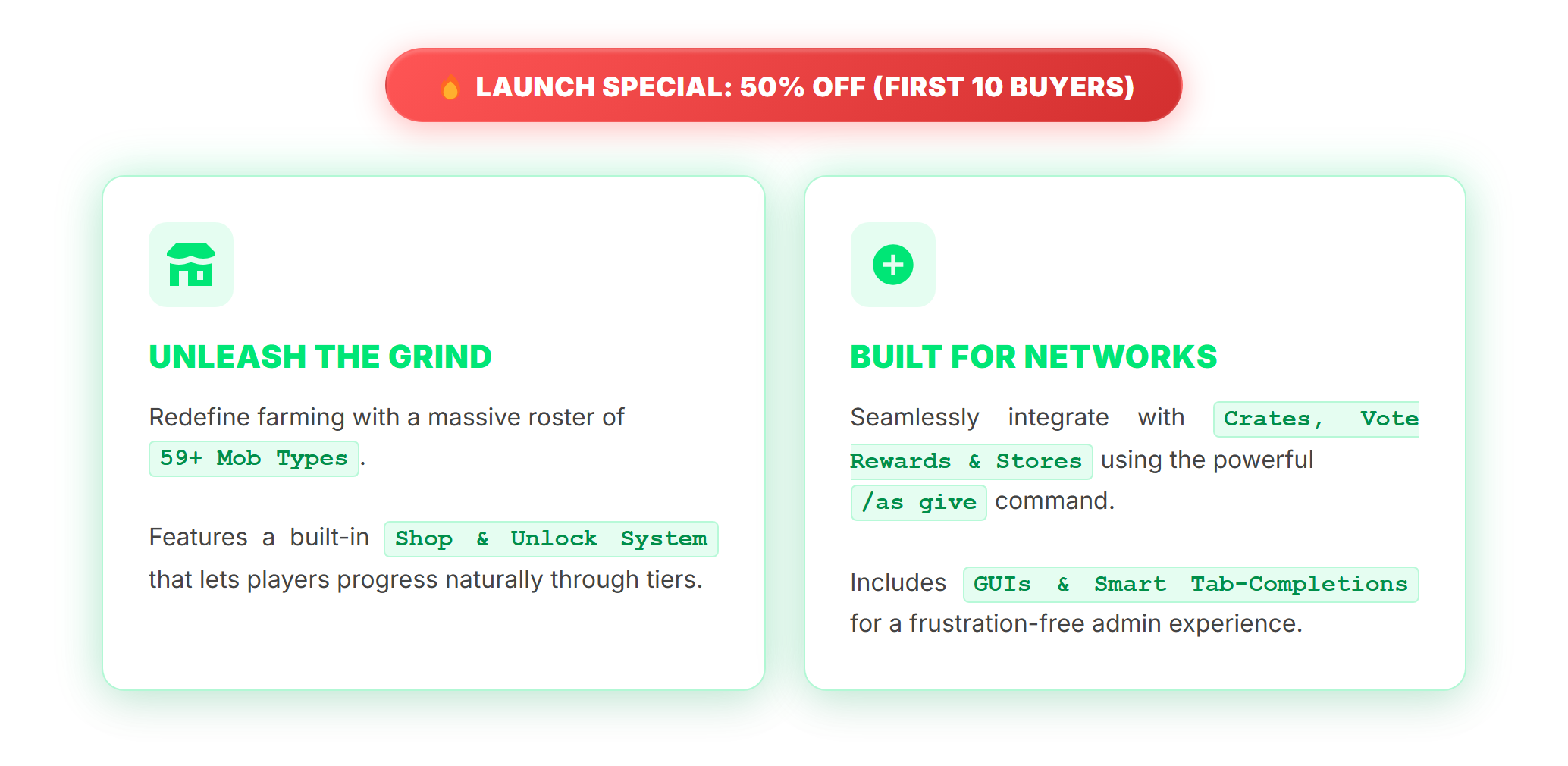
LAUNCH SPECIAL: 50% OFF (FIRST 10 BUYERS)
UNLEASH THE GRIND
Redefine farming with a massive roster of 59+ Mob Types.
Features a built-in Shop & Unlock System that lets players progress naturally through tiers.
BUILT FOR NETWORKS
Seamlessly integrate with Crates, Vote Rewards & Stores using the powerful /as give command.
Includes GUIs & Smart Tab-Completions for a frustration-free admin experience.
Want to try the plugin first? Get the Lite version

LAUNCH SPECIAL: 50% OFF (FIRST 10 BUYERS)
UNLEASH THE GRIND
Redefine farming with a massive roster of 59+ Mob Types.
Features a built-in Shop & Unlock System that lets players progress naturally through tiers.
BUILT FOR NETWORKS
Seamlessly integrate with Crates, Vote Rewards & Stores using the powerful /as give command.
Includes GUIs & Smart Tab-Completions for a frustration-free admin experience.
Want to try the plugin first? Get the Lite version
Spoiler: Text Transcript of Features
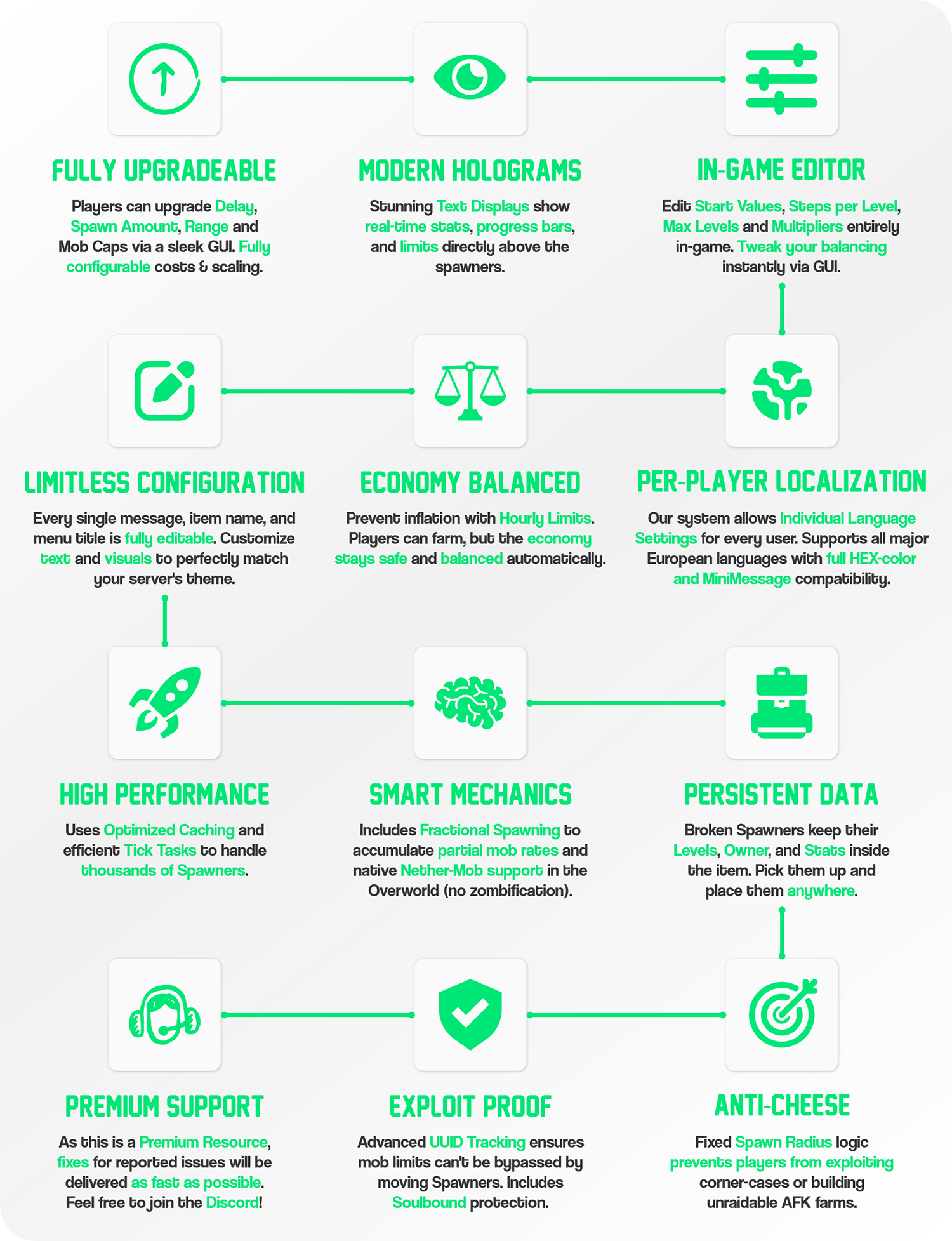
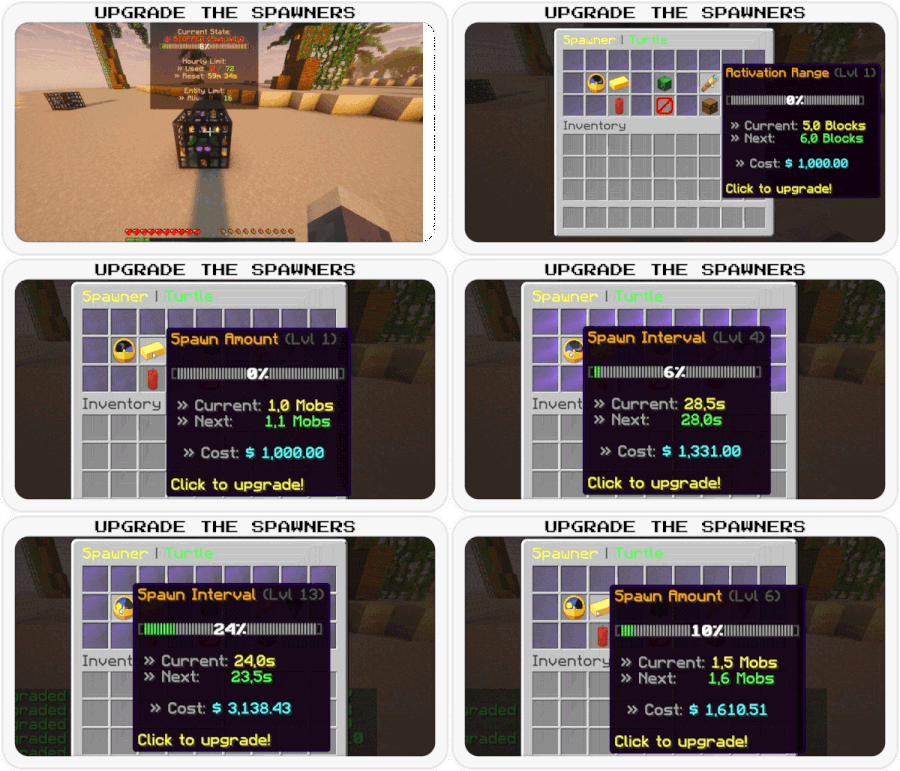
- FULLY UPGRADEABLE
- Players can upgrade Delay, Spawn Amount, Range and Mob Caps via a sleek GUI. Fully configurable costs & scaling.
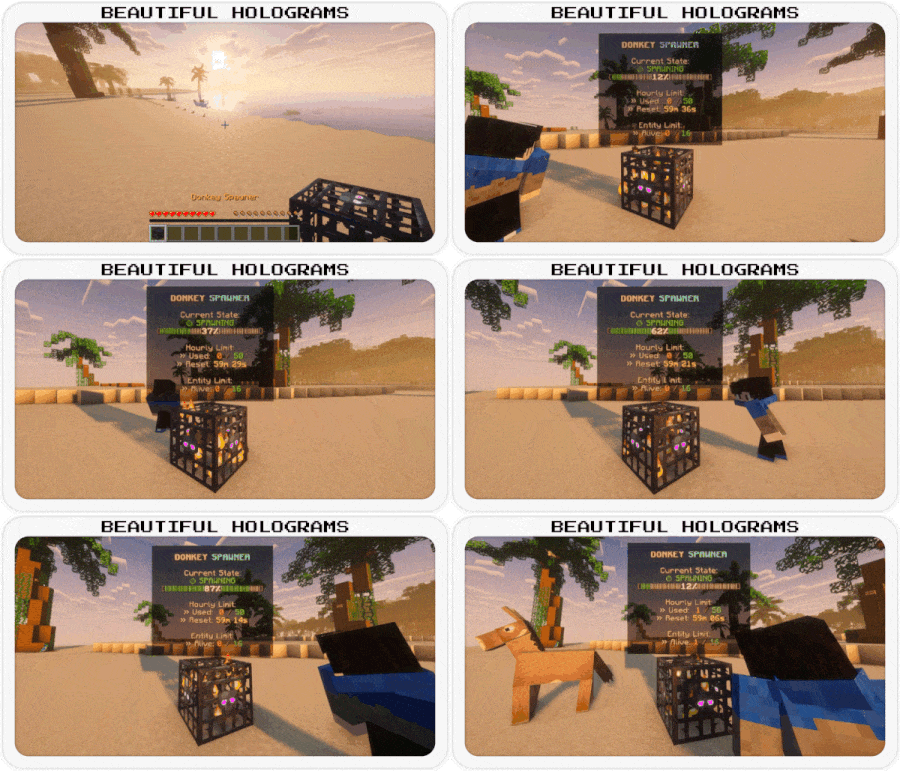
- MODERN HOLOGRAMS
- Stunning Text Displays show real-time stats, progress bars, and limits directly above the spawners.
- IN-GAME EDITOR
- Edit Start Values, Steps per Level, Max Levels and Multipliers entirely in-game. Tweak your balancing instantly via GUI.
- LIMITLESS CONFIGURATION
- Every single message, item name, and menu title is fully editable. Customize text and visuals to perfectly match your server's theme.
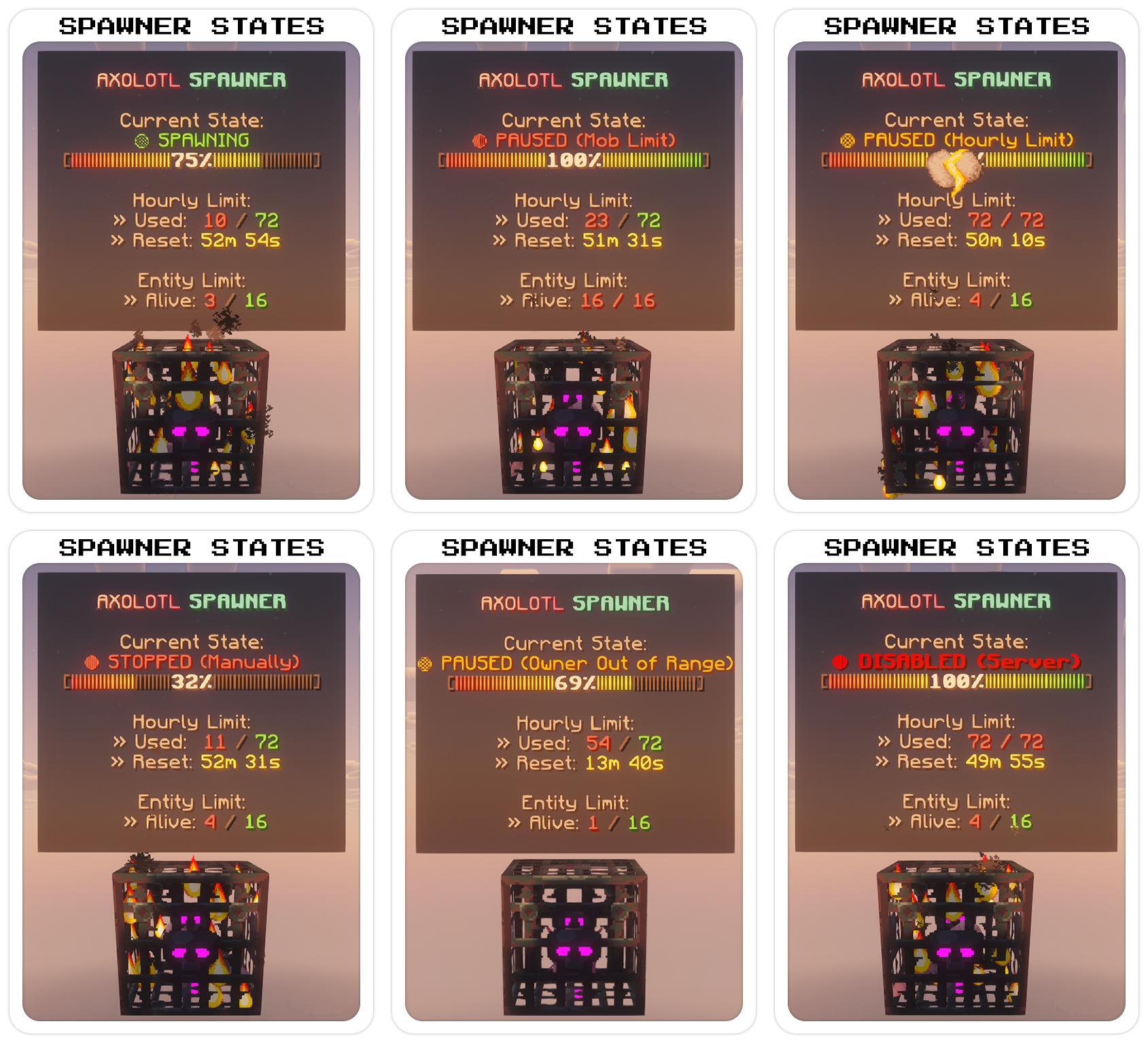
- ECONOMY BALANCED
- Prevent inflation with Hourly Limits. Players can farm, but the economy stays safe and balanced automatically.
- MULTI-LANGUAGE SUPPORT
- Includes English, German, French and Spanish out of the box. More languages will follow in future updates!
- HIGH PERFORMANCE
- Uses Optimized Caching and efficient Tick Tasks to handle thousands of spawners.
- SMART MECHANICS
- Includes Fractional Spawning to accumulate partial mob rates and native Nether-Mob support in the Overworld (no zombification).
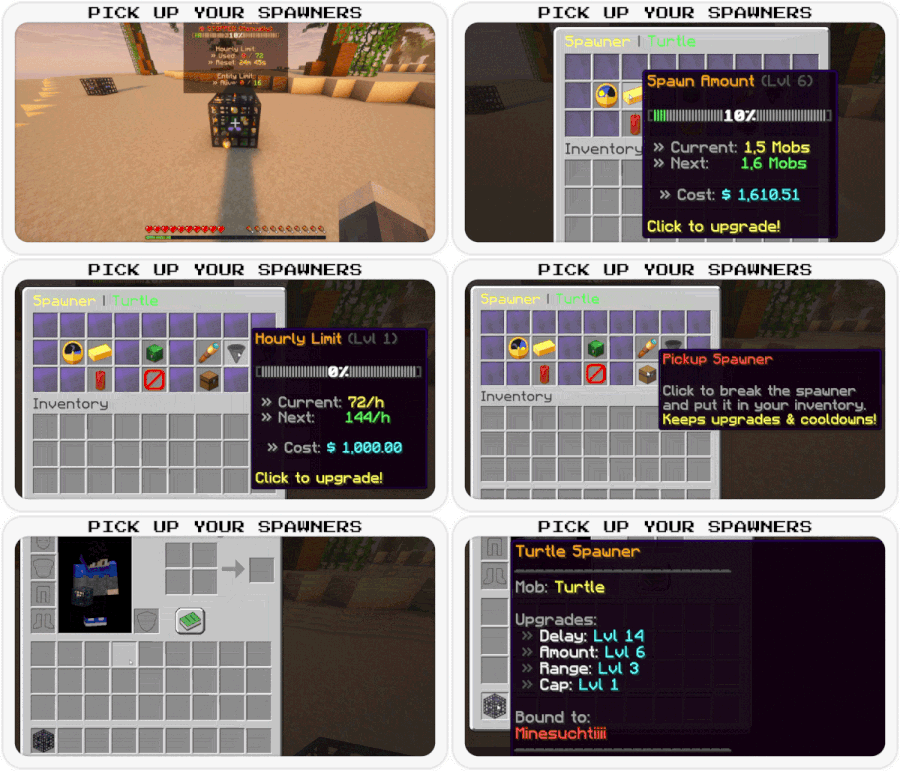
- PERSISTENT DATA
- Broken spawners keep their Levels, Owner, and Stats inside the item. Pick them up and place them anywhere.
- EXPLOIT PROOF
- Advanced UUID Tracking ensures mob limits can't be bypassed by moving spawners. Includes Soulbound protection.
- ANTI-CHEESE
- Fixed Spawn Radius logic prevents players from exploiting corner-cases or building unraidable AFK farms.
- PREMIUM SUPPORT
- As this is a premium resource, fixes for reported issues will be delivered as fast as possible. Feel free to join the Discord!
Code (YAML):
# ==============================================================================
# APEXSPAWNERS - CONFIGURATION & LANGUAGE FILE
#
# Format: MiniMessage (https://docs.advntr.dev/minimessage/format.html)
# Placeholders: <prefix> is automatically available in most messages.
# ==============================================================================
# Global Prefix used in chat messages
prefix: "<dark_gray>[<gradient:#00E676:#00BFA5>ApexSpawners</gradient><dark_gray>] <gray>"
# Console messages
console:
enabled: "<prefix><green>v<version> enabled successfully!"
disabled: "<prefix><red>disabled"
loading-textures: "<prefix><yellow>Loading item textures..."
vault-missing: "<prefix><dark_red><bold>ERROR: Vault dependency not found! Disabling plugin"
language-updater:
checking: "<prefix><yellow>Checking language files for missing keys..."
patched-file: "<prefix>Patched <white><file><gray>: Added <green><count> <gray>new keys."
done: "<prefix><green>Language patch finished. Total: <gold><total> <green>keys in <gold><files> <green>files."
error-resource: "<prefix><red>Could not find internal resource for: <file>"
error-save: "<prefix><red>Could not save updated language file: <file>"
update-available:
new-version-found: "<prefix><gray>A new version is available!"
current-version: "<prefix><gray>Current: <red>v<current>"
latest-version: "<prefix><gray>New: <green><new>"
download-link: "<prefix><yellow>Download: <click_spigot><hover:show_text:'<gold>Go to SpigotMC'><gradient:#FF9966:#FF5E62><b>[Spigot]</b></gradient></hover></click_spigot> <dark_gray>| <click_bbb><hover:show_text:'<aqua>Go to BuiltByBit'><gradient:#00F260:#0575E6><b>[BuiltByBit]</b></gradient></hover></click_bbb>"
error-checking: "<prefix><red>Failed to check for updates via SpigetAPI: <error>"
# ==============================================================================
# UPGRADES
# Names of the upgrades
# ==============================================================================
upgrade-names:
interval: "Spawn Interval"
amount: "Spawn Amount"
range: "Activation Range"
limit: "Hourly Limit"
# ==============================================================================
# ENTITY DEFINITIONS
# Names and categories for Mobs and Items
# ==============================================================================
# Display names for all supported mobs
mobs:
# Passive
bee: "<gradient:#FFD700:#FFA500>Bee</gradient>"
camel: "<gradient:#F4A460:#D2B48C>Camel</gradient>"
cat: "<gradient:#FFA500:#FFFFFF>Cat</gradient>"
chicken: "<gradient:#FFFFFF:#D3D3D3>Chicken</gradient>"
cow: "<gradient:#808080:#363636>Cow</gradient>"
donkey: "<gradient:#8B4513:#A0522D>Donkey</gradient>"
fox: "<gradient:#FF8C00:#FF4500>Fox</gradient>"
frog: "<gradient:#32CD32:#006400>Frog</gradient>"
goat: "<gradient:#D3D3D3:#FFFFFF>Goat</gradient>"
horse: "<gradient:#8B4513:#D2691E>Horse</gradient>"
llama: "<gradient:#F5DEB3:#D2B48C>Llama</gradient>"
mule: "<gradient:#8B4513:#2F4F4F>Mule</gradient>"
panda: "<gradient:#FFFFFF:#000000>Panda</gradient>"
parrot: "<gradient:#FF0000:#0000FF>Parrot</gradient>"
pig: "<gradient:#FFB6C1:#FF69B4>Pig</gradient>"
polar_bear: "<gradient:#F0F8FF:#B0E0E6>Polar Bear</gradient>"
rabbit: "<gradient:#DCDCDC:#808080>Rabbit</gradient>"
sheep: "<gradient:#FFFFFF:#DCDCDC>Sheep</gradient>"
sniffer: "<gradient:#8B0000:#228B22>Sniffer</gradient>"
turtle: "<gradient:#008000:#ADFF2F>Turtle</gradient>"
wolf: "<gradient:#D3D3D3:#696969>Wolf</gradient>"
# Utility & Golems
iron_golem: "<gradient:#E6E6E6:#A9A9A9>Iron Golem</gradient>"
snow_golem: "<gradient:#FFFFFF:#E0FFFF>Snow Golem</gradient>"
villager: "<gradient:#8B4513:#008000>Villager</gradient>"
wandering_trader: "<gradient:#00008B:#FFD700>Wandering Trader</gradient>"
# Hostile
breeze: "<gradient:#AFEEEE:#E0FFFF>Breeze</gradient>"
cave_spider: "<gradient:#006400:#2F4F4F>Cave Spider</gradient>"
creeper: "<gradient:#32CD32:#006400>Creeper</gradient>"
drowned: "<gradient:#00CED1:#2F4F4F>Drowned</gradient>"
elder_guardian: "<gradient:#D3D3D3:#4B0082>Elder Guardian</gradient>"
enderman: "<gradient:#9400D3:#000000>Enderman</gradient>"
evoker: "<gradient:#696969:#FFD700>Evoker</gradient>"
guardian: "<gradient:#00CED1:#FF8C00>Guardian</gradient>"
husk: "<gradient:#DAA520:#8B4513>Husk</gradient>"
phantom: "<gradient:#483D8B:#000080>Phantom</gradient>"
pillager: "<gradient:#696969:#8B0000>Pillager</gradient>"
ravager: "<gradient:#696969:#2F4F4F>Ravager</gradient>"
silverfish: "<gradient:#A9A9A9:#696969>Silverfish</gradient>"
skeleton: "<gradient:#F5F5F5:#A9A9A9>Skeleton</gradient>"
slime: "<gradient:#32CD32:#98FB98>Slime</gradient>"
spider: "<gradient:#8B0000:#000000>Spider</gradient>"
stray: "<gradient:#B0E0E6:#708090>Stray</gradient>"
vindicator: "<gradient:#696969:#00008B>Vindicator</gradient>"
warden: "<gradient:#008080:#00008B>Warden</gradient>"
witch: "<gradient:#800080:#008000>Witch</gradient>"
zombie: "<gradient:#006400:#228B22>Zombie</gradient>"
# Nether
blaze: "<gradient:#FFD700:#FF4500>Blaze</gradient>"
ghast: "<gradient:#F5F5F5:#DCDCDC>Ghast</gradient>"
hoglin: "<gradient:#FF6347:#8B0000>Hoglin</gradient>"
magma_cube: "<gradient:#8B0000:#FF4500>Magma Cube</gradient>"
piglin: "<gradient:#F08080:#DAA520>Piglin</gradient>"
piglin_brute: "<gradient:#8B0000:#DAA520>Piglin Brute</gradient>"
strider: "<gradient:#FF6347:#800080>Strider</gradient>"
wither_skeleton: "<gradient:#2F4F4F:#000000>Wither Skeleton</gradient>"
zoglin: "<gradient:#FF4500:#2F4F4F>Zoglin</gradient>"
zombified_piglin: "<gradient:#FF69B4:#006400>Zombified Piglin</gradient>"
# Water
axolotl: "<gradient:#FFB6C1:#FF69B4>Axolotl</gradient>"
glow_squid: "<gradient:#00CED1:#008B8B>Glow Squid</gradient>"
squid: "<gradient:#00008B:#4169E1>Squid</gradient>"
# Display names for mob categories (used in Shop Filter)
mob-types:
passive: "<green>Passive Mobs"
hostile: "<dark_red>Hostile Mobs"
nether: "<dark_purple>Nether Mobs"
utility_and_golems: "<gold>Utility & Golems"
water: "<aqua>Water Mobs"
# Item formats (Inventory Items)
items:
spawner:
name: "<gold><mob> Spawner"
# Top part of the lore (including stats)
lore-header:
- "<dark_gray><st> "
- "<gray>Mob: <mob>"
- ""
- "<gray>Upgrades:"
- "<dark_gray> » <white>Delay: <aqua>Lvl <delay>"
- "<dark_gray> » <white>Amount: <aqua>Lvl <amount>"
- "<dark_gray> » <white>Range: <aqua>Lvl <range>"
- "<dark_gray> » <white>Cap: <aqua>Lvl <cap>"
# Only displayed if the spawner has a specific owner
lore-owner:
- ""
- "<gray>Bound to:"
- "<red><name>"
# Bottom part of the lore
lore-footer:
- "<dark_gray><st> "
- "<yellow>Place to activate!"
# ==============================================================================
# CHAT MESSAGES
# General, Admin, Help, and Feature-specific messages
# ==============================================================================
general:
no-permission: "<prefix><red>You don't have permission to do this!"
only-players: "<prefix><red>This command can only be used by players!"
console-usage: "<prefix><red>Console must provide arguments (e.g. /spawners give ...)"
unknown-command: "<prefix><red>Unknown subcommand. Use <click:run_command:'/spawners help'><hover:show_text:'<green>Click to open help menu!'><gold>/spawners help</gold></hover></click> <red>for help"
usage-settings: "<prefix><gray>Usage: <gold>/spawners settings <mob>"
usage-give: "<prefix><red>Usage: /spawners give <player> <mob> [amount]"
mob-not-found: "<prefix><red>Mob <mob> not found!"
player-not-found: "<prefix><red>Player not found or offline"
invalid-mob-type: "<prefix><red>Invalid Mob Type. Use Tab-Complete"
invalid-amount: "<prefix><red>Invalid amount"
inventory-full: "<prefix><yellow>Inventory full! Item dropped on ground"
reload-success: "<prefix><green>Configuration and language files reloaded!"
admin:
give-sender: "<prefix><green>Gave <gold><amount></gold> <mob> <spawner_text> to <player>"
give-receiver: "<prefix><green>You received <gold><amount></gold> <mob> <spawner_text>"
help:
header: "<dark_gray><st> "
title: "<gradient:#00E676:#00BFA5>ApexSpawners</gradient> <bold><#00E676>Help"
overview: "<dark_gray> • <click:run_command:'/spawners'><hover:show_text:'<green>Click to view your spawners'><gold>/spawners</gold></hover></click> <gray>- Open your spawner overview"
shop: "<dark_gray> • <click:run_command:'/spawners shop'><hover:show_text:'<green>Click to open shop!'><gold>/spawners shop</gold></hover></click> <gray>- Open the spawner shop"
settings: "<dark_gray> • <click:run_command:'/spawners settings'><hover:show_text:'<yellow>Click to open settings'><gold>/spawners settings (mob)</gold></hover></click> <gray>- Open global or mob settings"
reload: "<dark_gray> • <click:run_command:'/spawners reload'><hover:show_text:'<red>Reload configs'><gold>/spawners reload</gold></hover></click> <gray>- Reload configuration"
give: "<dark_gray> • <click:suggest_command:'/spawners give '><hover:show_text:'<yellow>Give spawners to players'><gold>/spawners give <player> <mob> (amount)</gold></hover></click> <gray>- Give Spawners"
footer: "<dark_gray><st> "
shop:
buy-success: "<prefix>You purchased a <mob> spawner for <gold><price></gold>"
unlock-success: "<prefix>You unlocked <mob><green> spawners! You can now buy them"
unlock-failed-money: "<prefix><red>Not enough money to unlock this mob!"
no-permission-unlock: "<prefix><red>You don't have the permission to unlock this mob!"
buy-failed-money: "<prefix><red>Not enough money to buy this item!"
buy-failed-inventory: "<prefix><red>Your inventory is full!"
spawner:
# Interaction messages (Place/Break/Interact)
mob-disabled: "<prefix><red>This mob type is currently disabled by the server administration"
soulbound-place-prevent: "<prefix><red>You cannot place this Spawner! It is soulbound to another player"
place-success: "<mob><green> Spawner placed successfully!"
break-prevent: "<prefix><red>You cannot break this Spawner manually!"
break-hint: "<prefix><gray>Open the menu (Right-Click) to pick it up"
not-owner-edit: "<prefix><red>You cannot edit this Spawner! It belongs to another player"
# ==============================================================================
# VISUALS: HOLOGRAMS
# ==============================================================================
hologram:
# The hologram layout. Each line is a new line in-game.
# Empty strings ("") create vertical spacing.
lines:
- ""
- "<mob> <aqua><bold>SPAWNER"
- ""
- "<gray>Current State:"
- "<status>"
- "<progress_bar>"
- ""
- "<gray>Hourly Limit:"
- "<gray> » Used: <red><used> <hourly_limit_separator> <max_hourly_color><max>"
- "<gray> » Reset: <time>"
- ""
- "<gray>Entity Limit:"
- "<gray> » Alive: <red><alive> <separator> <max_color><max_alive>"
- ""
# Time formatting for holograms
time-format:
waiting: "<aqua>Waiting for Spawn..."
cooldown: "<yellow><minutes>m <seconds>s"
# ==============================================================================
# GRAPHICAL USER INTERFACES (GUIs)
# Configuration for all menus and inventories
# ==============================================================================
gui:
units:
seconds: "s"
mobs: " Mobs"
blocks: " Blocks"
per-hour: " Mobs/h"
# ---------------------------------------------------------------------
# Global Buttons (Used across multiple menus)
# ---------------------------------------------------------------------
buttons:
next-page:
name: "<green>Next Page"
lore:
- "<gray>Go to the"
- "<gray>next page"
previous-page:
name: "<red>Previous Page"
lore:
- "<gray>Return to the"
- "<gray>previous page"
close:
name: "<red>Close Menu"
lore:
- "<gray>Click to close"
back:
name: "<red>Go Back"
lore:
- "<gray>Return to the"
- "<gray>last menu"
# ---------------------------------------------------------------------
# Settings Hub Menu
# ---------------------------------------------------------------------
settings-hub-menu:
title: "<gradient:#00E676:#00BFA5>ApexSpawners</gradient> <dark_gray>| <white>Settings Hub"
language-item:
name: "<gradient:#00E676:#00BFA5><bold>Language"
lore:
- "<gray>Current: <green><current_lang>"
- ""
- "<gradient:#00E676:#00BFA5><bold>Click</bold></gradient> <gray>to <white>change language"
back-button:
name: "<green><bold>Back to Shop"
lore:
- "<gray>Click to return"
- "<gray>to the mob shop"
general-settings-item:
name: "<gradient:#00E676:#00BFA5><bold>General Settings"
lore:
- "<gray>Configure general"
- "<gray>plugin behavior."
- ""
- "<gradient:#00E676:#00BFA5><bold>Click</bold></gradient> <gray>to <white>open"
# ---------------------------------------------------------------------
# General Settings Menu
# ---------------------------------------------------------------------
general-settings-menu:
title: "<gradient:#00E676:#00BFA5><bold>General Settings"
back-button:
name: "<red>Back to Hub"
lore:
- "<gray>Click to return"
- "<gray>to the settings"
- "<gray>hub"
unlock-perm-item:
name: "<gold>Require Unlock Perms"
lore:
- "<gray>Restrict mob unlocking"
- "<gray>to players with:"
- "<white>apexspawners.unlock.<mob>"
- ""
- "<gray>Status: <status>"
- ""
- "<gradient:#00E676:#00BFA5><bold>Click</bold></gradient> <gray>to <white>toggle"
status-true: "<green>True"
status-false: "<red>False"
# ---------------------------------------------------------------------
# Language Selection Menu
# ---------------------------------------------------------------------
language-menu:
title: "<gradient:#00E676:#00BFA5><bold>Language Settings</gradient>"
items:
english:
name: "<active_color>English"
lore:
- "<gray>Click to select English"
- "<gray>as server language"
german:
name: "<active_color>Deutsch"
lore:
- "<gray>Click to select German"
- "<gray>as server language"
french:
name: "<active_color>Français"
lore:
- "<gray>Click to select French"
- "<gray>as server language"
spanish:
name: "<active_color>Español"
lore:
- "<gray>Click to select Spanish"
- "<gray>as server language"
messages:
changed: "<prefix><green>Language changed to <gold><lang><green>!"
already-selected: "<prefix><red>This language is already selected!"
# ---------------------------------------------------------------------
# Player Menu: Spawner Upgrades
# ---------------------------------------------------------------------
upgrade-menu:
title: "<yellow>Spawner <dark_gray>| <mob>"
# Time formatting specifically for this menu
time-format:
waiting: "<aqua>Ready"
cooldown: "<yellow><minutes>m <seconds>s"
# Status Indicators (Info Item & Toggle Button)
status:
disabled: "<dark_red><bold> DISABLED (Server)"
stopped: "<red> STOPPED (Manually)"
paused-mob-limit: "<red> PAUSED (Mob Limit)"
paused-hourly-limit: "<gold> PAUSED (Hourly Limit)"
owner-out-of-range: "<#FFA500> PAUSED (Owner Out of Range)"
active: "<green> SPAWNING"
active-toggle: "<green><bold>ACTIVE"
stopped-toggle: "<red><bold>STOPPED"
waiting: "<aqua>Waiting for Spawn..."
# Center Info Item
info-item:
name: "<mob> <aqua><bold>Spawner"
lore:
- ""
- "<gray>Current State:"
- "<status>"
- ""
- "<progress_bar>"
- ""
- "<gray>Hourly Limit:"
- "<gray> » Used: <red><used> <hourly_limit_separator> <max_hourly_color><max>"
- "<gray> » Reset: <time>"
- ""
- "<gray>Entity Limit:"
- "<gray> » Alive: <red><alive> <separator> <max_color><max_alive>"
# Upgrade Items (Delay, Amount, etc.)
upgrade-item:
name: "<gold><name> <dark_gray>(Lvl <level>)"
lore-current: "<gray> » Current: <yellow><value>"
lore-next: "<gray> » Next: <green><value>"
lore-cost: "<gray> » Cost: <aqua><cost>"
lore-click: "<yellow>Click to upgrade!"
lore-maxed: "<red><bold>MAX LEVEL REACHED"
# Toggle Button
toggle-item:
name: "<gray>Spawner Status: <status>"
lore:
- "<gray>Click to toggle"
# Break Button
break-item:
name: "<red>Pickup Spawner"
lore:
- ""
- "<gray>Click to break the spawner"
- "<gray>and put it in your inventory"
- "<yellow>Keeps upgrades & cooldowns!"
back-button:
name: "<red><bold>Back to your Spawners"
lore:
- "<gray>Click to return to your"
- "<gray>spawners overview"
# Feedback messages
messages:
upgrade-success: "<green>Upgraded <gold><feature>: <gray><st>Level <old></st> <dark_gray>» <green><bold>Level <new>"
not-enough-money: "<prefix><red>Not enough money!"
inventory-full: "<prefix><red>Your inventory is full!"
picked-up: "<prefix><green>Picked up <spawner><green> spawner"
# ---------------------------------------------------------------------
# Player Menu: Mob Shop (/as shop)
# ---------------------------------------------------------------------
shop-menu:
title: "<yellow>Shop <dark_gray>| <light_purple>Mob Spawners"
# Filter & Sort Button
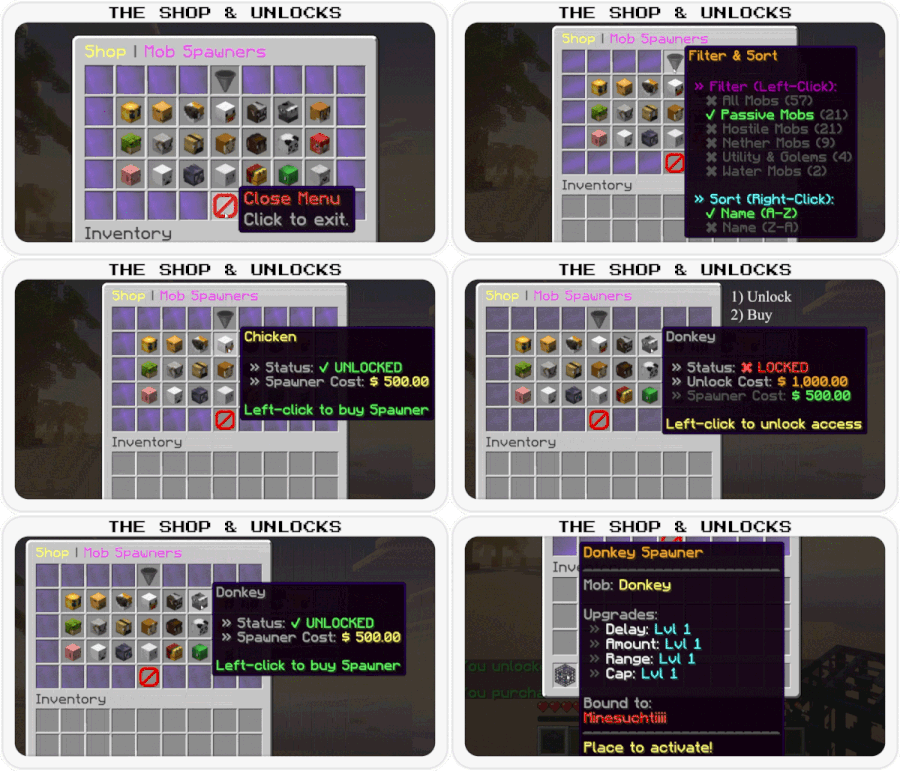
filter-item:
name: "<gold>Filter & Sort"
filter-all-name: "<yellow>All Mobs"
header-filter: "<dark_purple> » Filter (Left-Click):"
entry-active: "<green> ✔ <name> <counts>"
entry-inactive: "<dark_gray> ✖ <name> <counts>"
header-sort: "<aqua> » Sort (Right-Click):"
sort-asc-active: "<green> ✔ Name (A-Z)"
sort-asc-inactive: "<dark_gray> ✖ Name (A-Z)"
sort-desc-active: "<green> ✔ Name (Z-A)"
sort-desc-inactive: "<dark_gray> ✖ Name (Z-A)"
# Formats for counts next to filter names
count-format-admin: "<dark_gray>(<green>✔ <enabled> <red>✖ <disabled><dark_gray>)"
count-format-player: "<dark_gray>(<enabled>)"
# Mob Item Display
mob-item:
lore-admin-disabled: "<bold><red>⚠ DISABLED IN SHOP ⚠"
lore-admin-info: "<gradient:#FFD700:#FFAA00><bold>Right-Click</bold></gradient> <gray>to <white>edit settings"
# When mob is unlocked
lore-unlocked:
- "<gray> » Status: <green>✔ UNLOCKED"
- "<gray> » Spawner Cost: <yellow><price>"
- ""
- "<gradient:#00E676:#00BFA5><bold>Left-Click</bold></gradient> <gray>to <white>buy Spawner"
# When mob is locked
lore-locked:
- "<gray> » Status: <red>✖ LOCKED"
- "<gray> » Unlock Cost: <gold><unlock_price>"
- "<gray> » Spawner Cost: <green><buy_price>"
- ""
- "<gradient:#00E676:#00BFA5><bold>Left-Click</bold></gradient> <gray>to <white>unlock access"
# Admin Settings Button
admin-settings-item:
name: "<bold><gradient:#C62828:#FF5252:#C62828>Admin Settings</gradient>"
lore:
- "<gray>Open global configuration"
- "<gray>and language settings"
- ""
- "<gradient:#00E676:#00BFA5><bold>Click</bold></gradient> <gray>to <white>open"
your-spawners-button:
name: "<gradient:#00E676:#00BFA5><bold>Your Spawners"
lore:
- "<gray>Click here to manage"
- "<gray>your placed spawners"
# ---------------------------------------------------------------------
# Player Menu: Own Spawners (/as)
# ---------------------------------------------------------------------
your-spawners:
title: "<gradient:#00E676:#00BFA5>Your Spawners</gradient> <dark_gray>(<#00BFA5><count><dark_gray>)"
no-spawners:
name: "<red><bold>No Active Spawners"
lore:
- "<gray>You don't have any spawners"
- "<gray>in currently loaded chunks."
item:
name: "<mob> <aqua><bold>Spawner"
lore:
- "<dark_gray><st> "
- "<gray>Location:"
- " <dark_gray>» <yellow>World: <white><world>"
- " <dark_gray>» <yellow>X: <white><x> <yellow>Y: <white><y> <yellow>Z: <white><z>"
- ""
- "<gray>Upgrades:"
- " <dark_gray>» <white><label_delay>: <aqua>Lvl <level_delay> <dark_gray>/ <gray><max_delay>"
- " <dark_gray>» <white><label_amount>: <aqua>Lvl <level_amount> <dark_gray>/ <gray><max_amount>"
- " <dark_gray>» <white><label_range>: <aqua>Lvl <level_range> <dark_gray>/ <gray><max_range>"
- " <dark_gray>» <white><label_cap>: <aqua>Lvl <level_cap> <dark_gray>/ <gray><max_cap>"
- "<dark_gray><st> "
- "<gradient:#00E676:#00BFA5><bold>Left-Click</bold></gradient> <gray>to <white>Upgrade"
- "<gradient:#FFD700:#FFAA00><bold>Right-Click</bold></gradient> <gray>to <white>Teleport"
shop-button:
name: "<gradient:#FFD700:#FFAA00><bold>Open Mob Shop"
lore:
- "<gray>Click here to browse"
- "<gray>and purchase new"
- "<gray>spawners"
messages:
teleport-success: "<prefix><green>Teleported to your <mob> <green>spawner."
teleport-no-perm: "<prefix><red>You don't have permission to teleport to spawners."
not-loaded: "<prefix><red>This spawner is currently in an unloaded chunk."
# ---------------------------------------------------------------------
# Admin Menu: Mob Settings (Overview)
# ---------------------------------------------------------------------
settings-menu:
title: "<yellow>Settings <dark_gray>| <mob>"
# Row 2: Upgrade Cost Configuration
cost-item:
name: "<gradient:#FFD700:#FFAA00><name>"
lore:
- ""
- "<gray>Settings for Upgrade Costs:"
- "<gray> » Base Price: <green><base_price>"
- "<gray> » Scaling: <dark_purple>+<percentage>% / Level"
- ""
- "<gray> » Total to Max: <gold><bold><total_cost>"
- ""
- "<gradient:#00E676:#00BFA5><bold>Left-Click</bold></gradient> <gray>to <white>edit Base Price"
- "<gradient:#FFD700:#FFAA00><bold>Right-Click</bold></gradient> <gray>to <white>edit Scaling %"
# Display names for cost items
cost-names:
interval: "Spawn Interval Costs"
amount: "Spawn Amount Costs"
range: "Range Costs"
limit: "Cap Costs"
# Global Price Editor Button
global-prices-item:
name: "<green><bold>Edit Unlock & Buy Price"
lore:
- "<gray>Configure global costs"
- "<gray>for this mob type"
- ""
- "<gradient:#00E676:#00BFA5><bold>Click</bold></gradient> <gray>to <white>edit"
# Row 3: Grand Total Info
info-item:
name: "<bold><gradient:#D500F9:#651FFF>Grand Total Cost"
lore-header:
- ""
- "<gray>How much it costs to fully"
- "<gray>upgrade this mob spawner"
- "<dark_gray><st> "
# Format for single lines
lore-line: "<gray> • <label> <gold><value>"
lore-footer:
- "<dark_gray><st> "
- "<white>TOTAL: <light_purple><bold><total>"
# Labels for the info item
info-labels:
interval: "Max Interval:"
amount: "Max Amount:"
range: "Max Range:"
limit: "Max Limit:"
# Row 4: Balancing Stats Configuration
stat-item:
name: "<gradient:#00E5FF:#00B0FF><name>"
lore:
- ""
- "<gray>Settings for Game Balance:"
- "<gray> » Max Level: <white><max_level>"
- "<gray> » Start Value: <white><start_value><unit>"
- "<gray> » Step/Level: <white><step_sign><step_value><unit>"
- "<gray> » Final (Lvl <max_level>): <aqua><bold><final_value><unit>"
- ""
- "<gradient:#00E676:#00BFA5><bold>Click</bold></gradient> <gray>to <white>edit"
# Display names for stat items
stat-names:
interval: "Balancing: Spawn Interval"
amount: "Balancing: Spawn Amount"
range: "Balancing: Activation Range"
limit: "Balancing: Hourly Limit"
# Shop Toggle Button
toggle-item:
name-enabled: "<green><bold>Shop Status: ENABLED"
name-disabled: "<red><bold>Shop Status: DISABLED"
lore:
- ""
- "<gray> » Current: <status>"
- ""
- "<gradient:#00E676:#00BFA5><bold>Click</bold></gradient> <gray>to <white>toggle visibility"
# Status values (includes color)
status-visible: "<green>Visible"
status-hidden: "<red>Hidden"
back-button:
name: "<green><bold>Back to Shop"
lore:
- "<gray>Click to return"
- "<gray>to the mob shop"
# ---------------------------------------------------------------------
# Admin Menu: Edit Prices
# ---------------------------------------------------------------------
edit-prices-menu:
# Title variables: <mode_name>, <price>
title: "<yellow>Edit <dark_gray>| <mode_name> <dark_gray>| <dark_green><price>"
# Mode Names (include color)
mode-buy: "<green>Item Price"
mode-unlock: "<gold>Unlock Price"
switch-mode-item:
name: "<gradient:#00E5FF:#00B0FF>Switch Mode"
lore:
- "<gray>Currently editing: <mode_name>"
- ""
- "<gradient:#00E676:#00BFA5><bold>Click</bold></gradient> <gray>to <white>swap to <next_mode>"
info-item:
name: "<mob>"
lore:
- "<gray>Editing: <mode_name>"
# Save Buttons
save-back-item:
name: "<green><bold>Save & Back"
lore:
- "<gray>Save changes and"
- "<gray>return to the last menu"
save-stay-item:
name: "<green><bold>Save Changes"
lore:
- "<gray>Saves the current"
- "<gray>value but stays in"
- "<gray>this menu"
# Modifier Buttons (+/-)
modifier-item:
name-increase: "<green>+ <amount>"
name-decrease: "<red>- <amount>"
# Chat Feedback
messages:
save-success: "<prefix><green>Set <mode_name> <green>for <mob> <green>to <yellow><price>"
# ---------------------------------------------------------------------
# Admin Menu: Value Editor
# ---------------------------------------------------------------------
value-editor-menu:
title: "<yellow>Edit <dark_gray>| <gold><upgrade> <dark_gray>| <dark_gray><mode>"
# Names for Editor Modes
mode-names:
base-price: "Base Price"
multiplier: "Scaling %"
max-level: "Max Level"
value-start: "Start Value"
value-step: "Step per Level"
# Switch Mode Button
switch-mode-item:
name: "<gold><bold>Switch Edit Mode"
lore-header: "<gray> » Current Mode:"
mode-active: "<green> ✔ <name>"
mode-inactive: "<gray> ✖ <name>"
lore-footer:
- ""
- "<gradient:#00E676:#00BFA5><bold>Left-Click</bold></gradient> <gray>for <white>Previous Mode"
- "<gradient:#FFD700:#FFAA00><bold>Right-Click</bold></gradient> <gray>for <white>Next Mode"
# Center Display Item
display-item:
name: "<gray>Current Value:"
value: "<gold><bold><value>"
# Preview for Cost modes
preview-cost:
label: "<gray> » Total to Max (Preview):"
value: " <dark_purple><bold><value>"
# Preview for Stat modes
preview-stat:
label: "<gray> » Final Stat at Lvl <level>:"
value: " <aqua><bold><value>"
# Modifier Buttons (+/-)
modifier-item:
name-increase: "<green>+ <value>"
name-decrease: "<red>- <value>"
# Navigation Items
save-back-item:
name: "<green><bold>Save & Back"
lore:
- "<gray>Save changes"
- "<gray>and return"
quick-save-item:
name: "<green><bold>Quick Save"
lore:
- "<gray>Saves the current"
- "<gray>value but stays in"
- "<gray>this menu"
nav-prev-item:
name: "<yellow>« Previous Setting"
lore:
- "<gray>Edit same value"
- "<gray>for previous Upgrade"
nav-next-item:
name: "<yellow>Next Setting »"
lore:
- "<gray>Edit same value"
- "<gray>for next Upgrade"
# Chat Feedback
messages:
save-success: "<prefix><green>Set <gold><upgrade> <dark_gray>(<mode>) <green>for <mob> <green>to <yellow><value>"
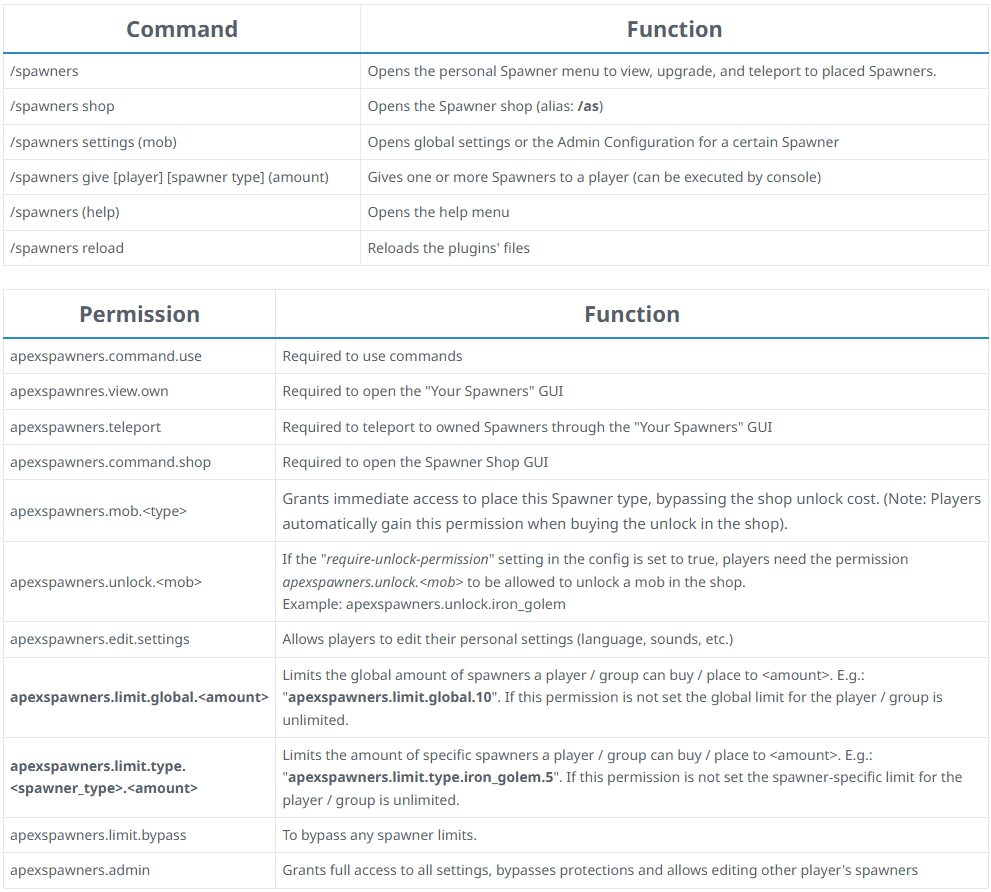
Spoiler: Transcript Commands & Permissions
Command | Function
/spawners (shop) - Opens the Spawner shop (alias: /as)
/spawners settings [mob] - Opens the Admin Configuration for a certain spawner
/spawners give [player] [spawner type] (amount) - Gives one or more spawners to a player (can be executed by console)
/spawners help - Opens the help menu
Permission | Function
apexspawners.command.use - Required to use commands
apexspawners.command.shop - Required to open the spawner Shop GUI
apexspawners.mob.<type> - Grants immediate access to place this spawner type, bypassing the shop unlock cost. (Note: Players automatically gain this permission when buying the unlock in the shop).
apexspawners.unlock.<mob> - If the "require-unlock-permission" setting in the config is set to true, players need the permission apexspawners.unlock.<mob> to be allowed to unlock a mob in the shop.
Example: apexspawners.unlock.iron_golem
apexspawners.admin - Grants full access to all settings, bypasses protections and allows editing other player's spawners
Command | Function
/spawners (shop) - Opens the Spawner shop (alias: /as)
/spawners settings [mob] - Opens the Admin Configuration for a certain spawner
/spawners give [player] [spawner type] (amount) - Gives one or more spawners to a player (can be executed by console)
/spawners help - Opens the help menu
Permission | Function
apexspawners.command.use - Required to use commands
apexspawners.command.shop - Required to open the spawner Shop GUI
apexspawners.mob.<type> - Grants immediate access to place this spawner type, bypassing the shop unlock cost. (Note: Players automatically gain this permission when buying the unlock in the shop).
apexspawners.unlock.<mob> - If the "require-unlock-permission" setting in the config is set to true, players need the permission apexspawners.unlock.<mob> to be allowed to unlock a mob in the shop.
Example: apexspawners.unlock.iron_golem
apexspawners.admin - Grants full access to all settings, bypasses protections and allows editing other player's spawners
Spoiler: Transcript of the roadmap
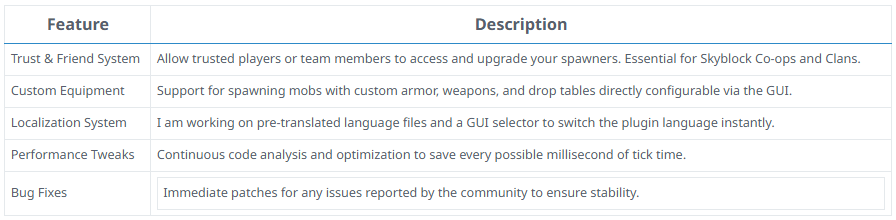
Feature | Description Trust & Friend System - Allow trusted players or team members to access and upgrade your spawners. Essential for Skyblock Co-ops and Clans. Custom Equipment - Support for spawning mobs with custom armor, weapons, and drop tables directly configurable via the GUI. Localization System - I am working on pre-translated language files and a GUI selector to switch the plugin language instantly. Performance Tweaks - Continuous code analysis and optimization to save every possible millisecond of tick time. Bug Fixes - Immediate patches for any issues reported by the community to ensure stability.
Feature | Description Trust & Friend System - Allow trusted players or team members to access and upgrade your spawners. Essential for Skyblock Co-ops and Clans. Custom Equipment - Support for spawning mobs with custom armor, weapons, and drop tables directly configurable via the GUI. Localization System - I am working on pre-translated language files and a GUI selector to switch the plugin language instantly. Performance Tweaks - Continuous code analysis and optimization to save every possible millisecond of tick time. Bug Fixes - Immediate patches for any issues reported by the community to ensure stability.
Spoiler: Transcript of the FAQ
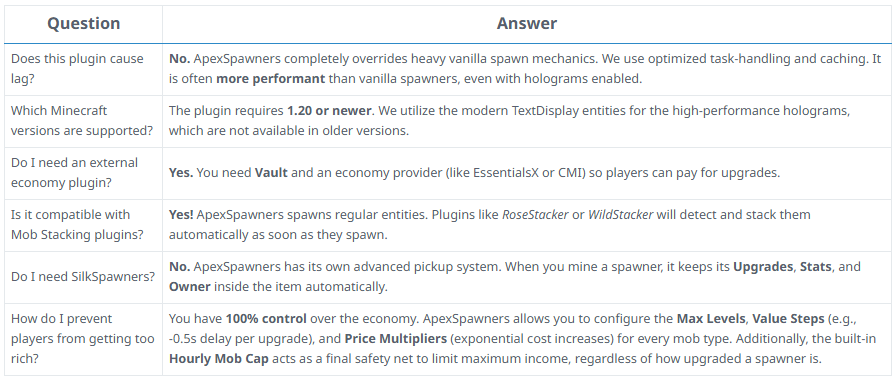
Does this plugin cause lag? - No. ApexSpawners completely overrides heavy vanilla spawn mechanics. We use optimized task-handling and caching. It is often more performant than vanilla spawners, even with holograms enabled.
Which Minecraft versions are supported? - The plugin requires 1.20 or newer. We utilize the modern TextDisplay entities for the high-performance holograms, which are not available in older versions.
Do I need an external economy plugin? - Yes. You need Vault and an economy provider (like EssentialsX or CMI) so players can pay for upgrades.
Is it compatible with Mob Stacking plugins? - Yes! ApexSpawners spawns regular entities. Plugins like RoseStacker or WildStacker will detect and stack them automatically as soon as they spawn.
Do I need SilkSpawners? - No. ApexSpawners has its own advanced pickup system. When you mine a spawner, it keeps its Upgrades, Stats, and Owner inside the item automatically.
How do I prevent players from getting too rich? - You have 100% control over the economy. ApexSpawners allows you to configure the Max Levels, Value Steps (e.g., -0.5s delay per upgrade), and Price Multipliers (exponential cost increases) for every mob type. Additionally, the built-in Hourly Mob Cap acts as a final safety net to limit maximum income, regardless of how upgraded a spawner is.
Does this plugin cause lag? - No. ApexSpawners completely overrides heavy vanilla spawn mechanics. We use optimized task-handling and caching. It is often more performant than vanilla spawners, even with holograms enabled.
Which Minecraft versions are supported? - The plugin requires 1.20 or newer. We utilize the modern TextDisplay entities for the high-performance holograms, which are not available in older versions.
Do I need an external economy plugin? - Yes. You need Vault and an economy provider (like EssentialsX or CMI) so players can pay for upgrades.
Is it compatible with Mob Stacking plugins? - Yes! ApexSpawners spawns regular entities. Plugins like RoseStacker or WildStacker will detect and stack them automatically as soon as they spawn.
Do I need SilkSpawners? - No. ApexSpawners has its own advanced pickup system. When you mine a spawner, it keeps its Upgrades, Stats, and Owner inside the item automatically.
How do I prevent players from getting too rich? - You have 100% control over the economy. ApexSpawners allows you to configure the Max Levels, Value Steps (e.g., -0.5s delay per upgrade), and Price Multipliers (exponential cost increases) for every mob type. Additionally, the built-in Hourly Mob Cap acts as a final safety net to limit maximum income, regardless of how upgraded a spawner is.
Spoiler: Transcript Discord Support
Join the Discord Server!
Fast Support
Feature Requests
Bug Reports & Fixes
Join the Discord Server!
Fast Support
Feature Requests
Bug Reports & Fixes


![[Ultimate] Custom Nodes](/data/resource_icons/18/18018.jpg?1782808787)