

Holograms
Holograms is a plugin that implements text and item holograms
The plugin offers the following commands:
Creating Holograms Lines
All hologram lines are created through the following commands:
Text Holograms
Text holograms are added simply by typing any text into the hologram line commands. Examples:
Item Holograms
To define an item line, prefix the <text> portion of the command with item: followed by the item definition. Examples:
Animated Text Holograms
Creating an animated text line is done through the animated_text <text> prefix. Changing the speed of the animation is done by defining a milliseconds amount in brackets, defaulting to 5000 (5 seconds). Slides of text are separated using ||.
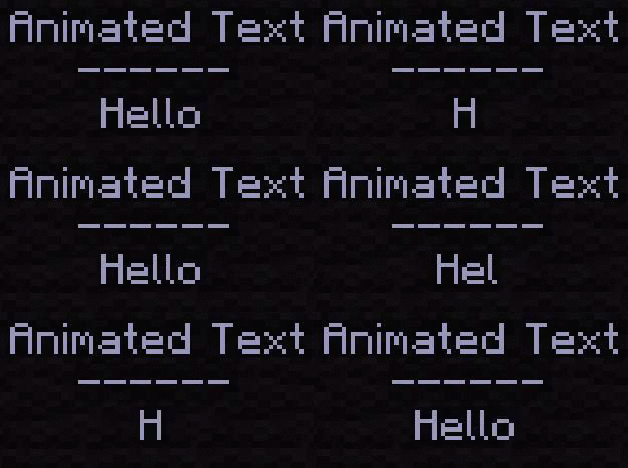
Examples:
Animated Item Holograms
Created an animated item line is done the same way as animated text lines, only with the animated_item <text> prefix. The same item format as that in item holograms is required for each item slide.
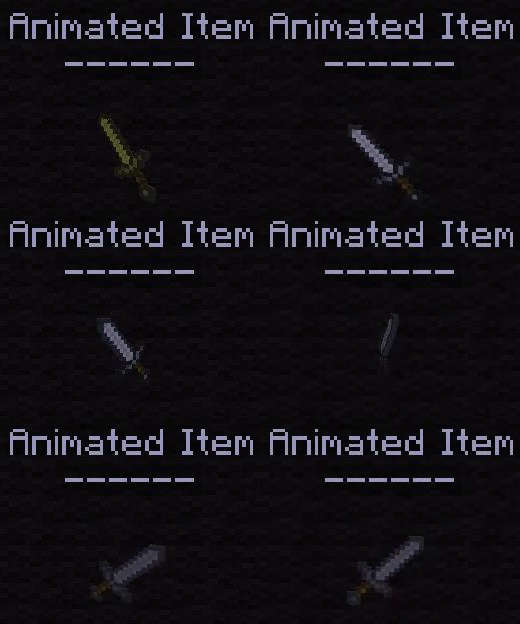
Examples:
Holograms is a plugin that implements text and item holograms
- Bug reports: https://github.com/sainttx/Holograms/issues
- Source code: https://github.com/sainttx/Holograms
- Text holograms
- Item holograms
- Animated holograms
- Placeholders (https://www.spigotmc.org/resources/holograms-placeholders.19813/)
The plugin offers the following commands:
- /holograms addline <name> <text>
- /holograms create <name> <text>
- /holograms delete <name>
- /holograms <import> plugin
- /holograms info <name>
- /holograms insertline <name> <index> <text>
- /holograms list
- /holograms movehere <name>
- /holograms near <radius>
- /holograms removeline <name> <index>
- /holograms setline <name> <index> <text>
Creating Holograms Lines
All hologram lines are created through the following commands:
- /holograms addline <name> <text>
- /holograms insertline <name> <text>
- /holograms removeline <name> text>
Text Holograms
Text holograms are added simply by typing any text into the hologram line commands. Examples:
- /holograms addline demo Line to add
- /holograms insertline demo 0 Inserted line text
- /holograms setline demo 0 Edited line text
Item Holograms
To define an item line, prefix the <text> portion of the command with item: followed by the item definition. Examples:
- /holograms addline demo item:golden_apple:1 1
- /holograms insertline demo 0 item:diamond_sword 1 damage_all:1
- /holograms setline demo 0 item:gold_sword 1
Animated Text Holograms
Creating an animated text line is done through the animated_text <text> prefix. Changing the speed of the animation is done by defining a milliseconds amount in brackets, defaulting to 5000 (5 seconds). Slides of text are separated using ||.
Examples:
- /holograms addline demo animated_text:H||He||Hel||Hell||Hello
- /holograms insertline demo 0 animated_text(500):Line 1||Line 2||Line 3
- /holograms setline demo 0 animated_text:Line 1||Line 2||Line 3
Animated Item Holograms
Created an animated item line is done the same way as animated text lines, only with the animated_item <text> prefix. The same item format as that in item holograms is required for each item slide.
Examples:
- /holograms addline demo animated_item:diamond_sword 1||gold_sword 1||iron_sword 1
- /holograms insertline demo 0 animated_item(500):diamond_sword 1||gold_sword 1||iron_sword 1
- /holograms setline demo 0 animated_item:stone 1||dirt 1||grass 1


